
StreamaxZ5

Did you know?

A door event can start Z5 recording and send an alarm with video evidence.

PREPARING YOUR EXPERIENCE0%
3D models
Preparing 4 models
Videos
0 / 2 ready

Loading the complete experience…

Skip to content
StreamaxZ5
Explore the featuresStreamax Trucking ↗

Z5 · Container camera

See inside
every shipment.

From the first pallet to the final delivery.

Z5 brings cargo video, location and sensor events into one connected view. See how goods are loaded, what changes on the road and which events need your attention.

Explore Z5 in action ↓
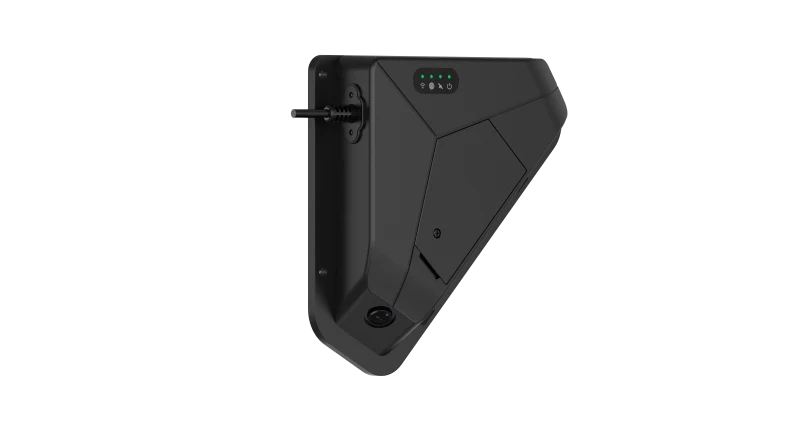
Z5 Streamax Z5 container camera, showing its housing and downward-facing lens
Inside the container. Close to the cargo.
01 / SeeZ5 inside

Video of the cargo and the work around it.

02 / ConnectABS outside

Container location connected to the platform.

03 / UnderstandStreamax platform

Video, readings and events ready for review.

Explore Z5Location Door events Load & space Time & care Cargo protection Conditions

Visibility through the journey

Six ways to stay closer
to your cargo.

Follow a container from the yard to the loading bay and onto the road. Explore each feature below, and play its animation to see the system respond.

01 / GPS tracking

Your container moves.
Stay in the picture.

A shipment should never become a question mark between stops. The ABS box reports the container’s GPS location to the Streamax platform, giving your team a map view of its journey and arrival.

  • Follow the container’s position
  • Review its route and arrival
A truck with GPS signals from the ABS box and its route on the platform map
Watch the ABS signal and platform map
Interactive 3DAcquiring GPS position
Preparing the truck, Z5 & ABSLoading the 3D models
The 3D view could not load.

The scenario explanation and footage remain available.

Z5 + ABSZ5 inside · ABS outsideReady to record
Door sensor · closed
Cargo fireHeat building near the sensor
Temperature sensor20.0 °C
Humidity sensor50% RH
ABS · GPSAcquiring location
Rough handling detectedCarton falling
Z5 · Waiting for activity
AI volume scan · DemoWaiting for the first palletWaiting for pallet measurement
0%occupied
Container locationPlatform · Demo
DEPOTDELIVERY BAYService roadWarehouse AWarehouse B
Depot · awaiting position—
Container Z5-024Acquiring GPS
↗
Waiting for location

The map follows the container’s position.

0 fixes
Z5 · Mounted view (demo)STANDBY
Door ClosedZ5 Standby
↗
Waiting for a door event

An event clip will accompany the alarm.

0%
Model volume occupied
0 boxes loadedWaiting for cargo
Measured goodsEmpty space —Empty-space scan follows loading

Recorded example footage

Z5 · Mounted view (demo)STANDBY
Loading time00:00
Auto start
Example limit 25:000 pallets
↗
Waiting for work to begin

The clock starts when the first pallet moves.

Activity detectedWaiting
Handling checkMonitoring
Z5 · Mounted view (demo)REC
!
Cargo baseline captured

Monitoring the loaded cargo.

Temperature20.0°CDemo limit: 28 °CWithin limit
Humidity50% RHDemo limit: 70% RHWithin limit
Temperature trend°C
Start18 seconds
!
Conditions within limits

Sensors are monitoring the container.

From the ABS box to a place on the map.

The platform receives container location updates.

Fire-zone temperature is simulated, not the sensor’s operating range. NIST fire-temperature reference ↗

Try another example
00:00 / 00:24
Drag to rotate · scroll / pinch to zoom · keyboard + / −

Interactive demonstration · Simulated events and readings · Recorded example footage

02 / Door-triggered recording

The door opens.
The story is recorded.

Opening the container is an event worth seeing. The door sensor triggers Z5 to record, while an alarm reaches the platform with video evidence ready for review. Your team can see the event behind the notification.

  • Start recording from a door event
  • Connect the alarm with video evidence
An open container door triggers the door sensor, Z5 recording and a platform alarm
See the sensor, recording and alarm sequence

03 / Loading & volume

See the load.
Measure the space.

Follow the loading process through Z5 video. Platform AI estimates the space occupied by cargo, then scans the empty headroom, aisles and gaps to complete the picture. A visual record of the load helps your team understand how the container is being used.

  • Monitor pallet loading on video
  • Measure occupied and empty space
Pallets inside a truck with occupied cargo and empty spaces scanned, alongside loading footage
Explore loading footage and the full-container scan

04 / Loading/unloading time & care handling

Every pallet matters.
Every minute counts.

Z5 starts timing when loading or unloading begins. Follow each pallet transfer, review extended stops and see when goods are handled roughly. Video gives supervisors the context to investigate delays and handling incidents.

  • Time loading and unloading automatically
  • Review delays and rough handling
A worker withdraws a pallet jack before a loose carton falls, with the incident shown in the camera view
Switch between loading, unloading and handling examples

05 / Cargo protection

Loaded securely.
Watched along the way.

A stable load can change during transportation. Z5 watches for cargo movement and visible damage, flags a change and sends an alarm to the platform. Review the footage to understand what happened inside.

  • Detect changes in cargo position
  • Review visible damage with video
Shifted cargo is highlighted inside the container and flagged in the Z5 camera view
Compare cargo movement and visible damage

06 / Temperature & humidity

Conditions change.
Know when they do.

Heat and moisture can put a shipment at risk. Connected temperature and humidity sensors track conditions inside the container and send platform alarms when configured limits are exceeded. Explore everyday sun heating, a cargo-fire scenario and rain entering through a roof crack.

  • Track temperature and humidity
  • Connect changing conditions with alarms
Sunlight heats the container while the platform charts rising temperature and shows an alarm
Try sun heating, cargo fire or roof-crack rain

The shipment, in context

More than a location.
A view of what happened.

Connect where your cargo is with how it was loaded, how it was handled and what changed during the journey.

Explore Streamax Trucking ↗
© 2026 Streamax Technology Co., Ltd.Z5 container cameraBack to top ↑